Follow along step by step
A backlog that is half wishes and half defects stops being a plan. Two people described exactly that to Jira's own community in 2020.
One had a backlog that was "extremely cluttered with tasks and bugs that don't and won't find their way into a sprint" (Atlassian Community, 2020).
The other wanted "only User Stories and Tasks in the Board view and Backlog view while showing bugs in kind of an "bugs" section" (Atlassian Community, 2020).
The community answers point at four things, in order of effort.
Separate work types, because "we have different issue types in Jira for Bugs, Defects, App Features, Landing Pages and Software Engineering" (Atlassian Community, 2019).
A board filter, because "Each board is driven by a filter (query)" (Atlassian Community, 2024).
A second board, because "There's not really a concept of a sub-board - it's just another board" (Atlassian Community, 2020).
And a move, for the ones that went in wrong. This post builds all four on a free Jira Cloud site, no Marketplace apps.
Jira's newer interface says Space, Space settings, Work types and Work items where older sites say Project, Project settings, Issue types and Issues; the clicks are the same.
What each piece is for
| Jira object | Use it for | Cannot do |
|---|---|---|
| Two work types | Requests and bugs as different objects | Stop someone picking the wrong one |
| Board Work type filter | Seeing one kind at a time | Persist. The selection is yours, not the team's |
| Labels | Product area inside each kind | Survive a typo, which becomes a new label |
| Saved custom filter | The split, reusable, in JQL | Apply outside its own space |
| Second space | A queue the sprint board never sees | Hide anything on a Free site |
| Move | Fixing a stray, one item at a time | Happen on its own |
How to set it up
About fifteen minutes on a site that already has a Feature Requests space. Everything below is team-managed, so one person does it without a Jira admin.
1. Give each kind its own work type
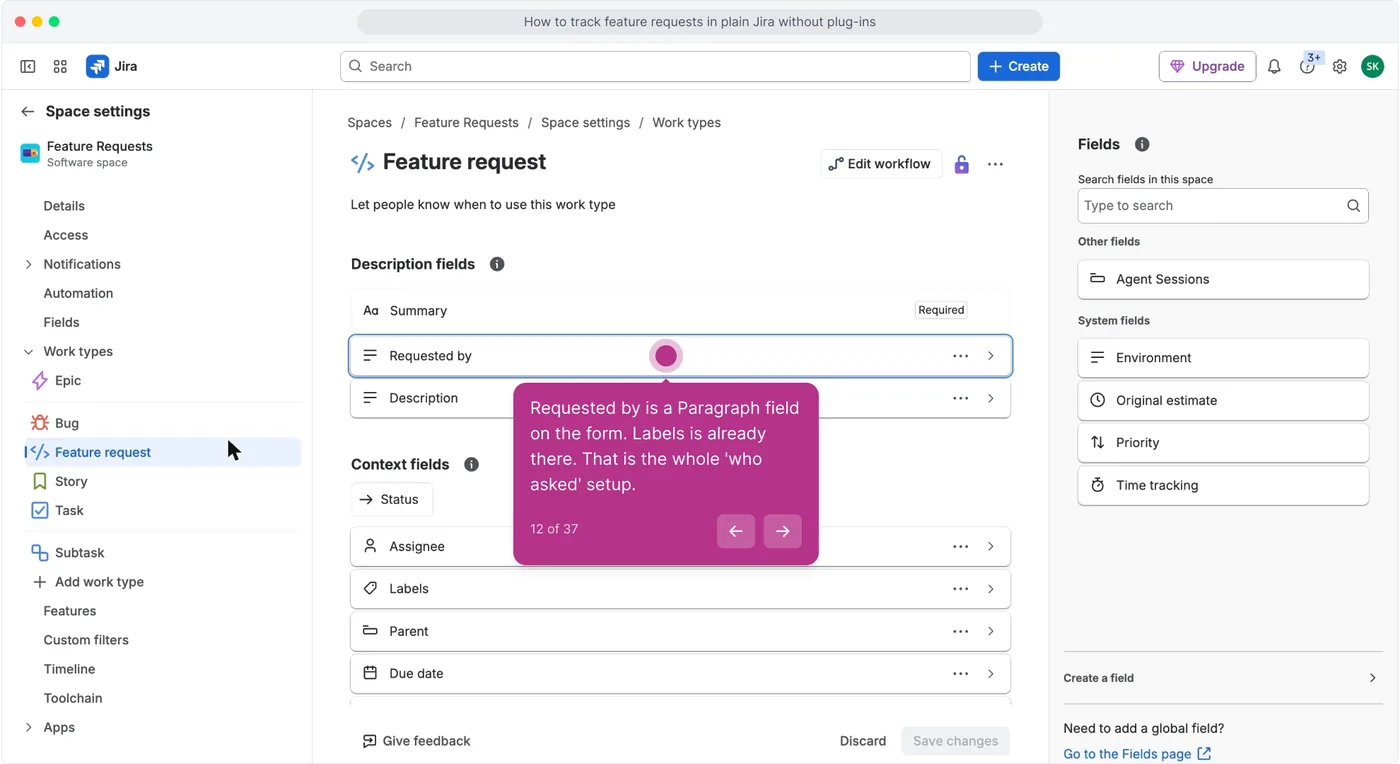
Open Space settings, click Work types, and check that Feature request and Bug both exist.
This is the separator that survives everything else. A label can be removed, a filter can be unticked, but a work type is stamped on the item at creation and shows in every view.
2. Split the board by type and label
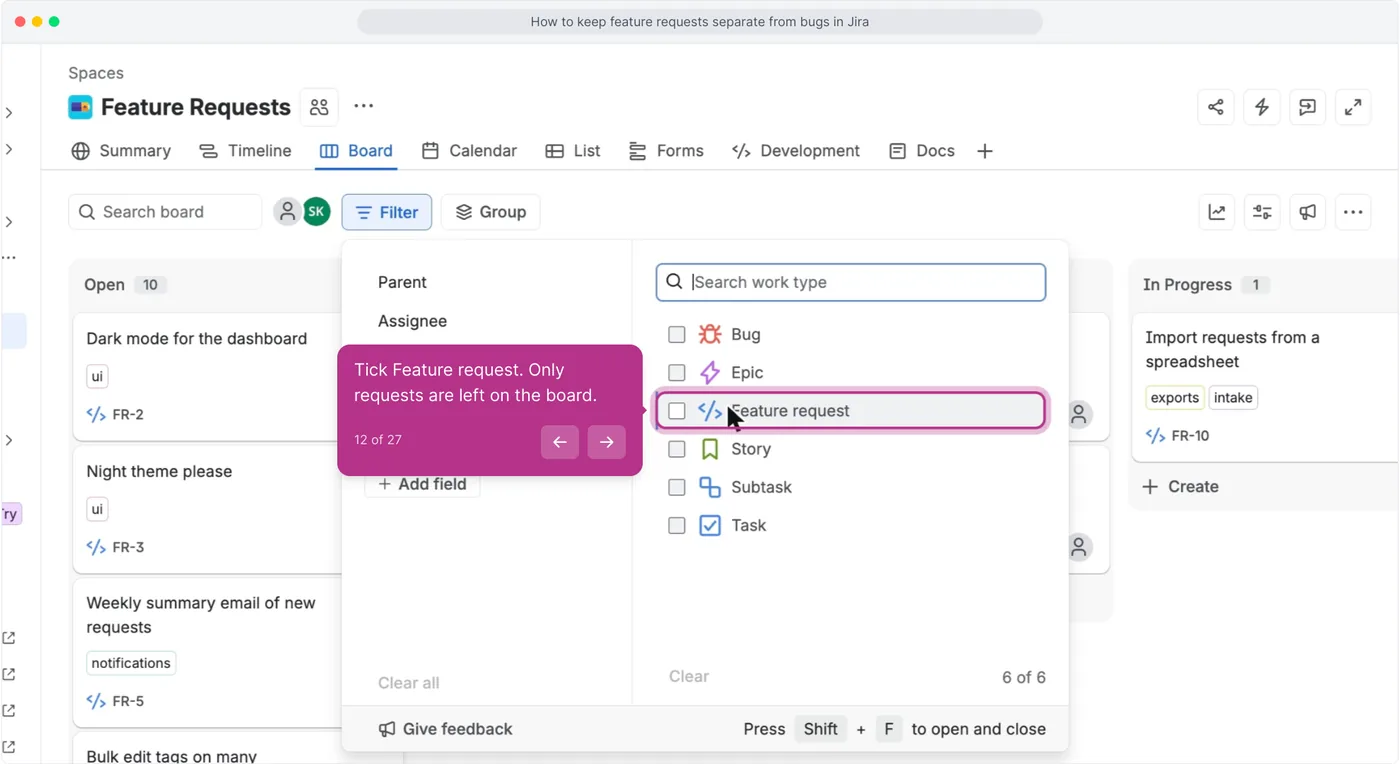
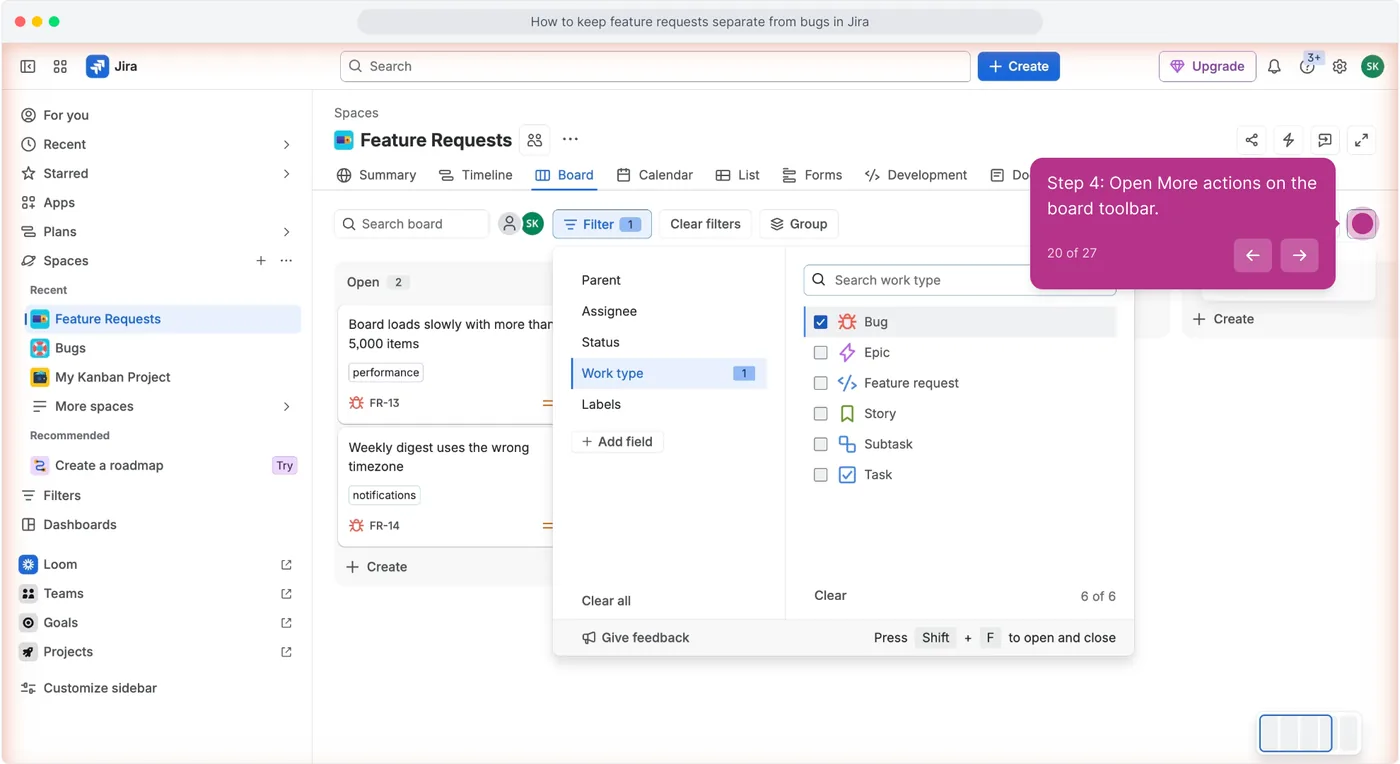
On the board click Filter, then tick Feature request under Work type.
The bugs drop off the board. This is the cheap version of the accepted answer that suggested a "quick filter to exclude the 'less important' issues" (Atlassian Community, 2020).
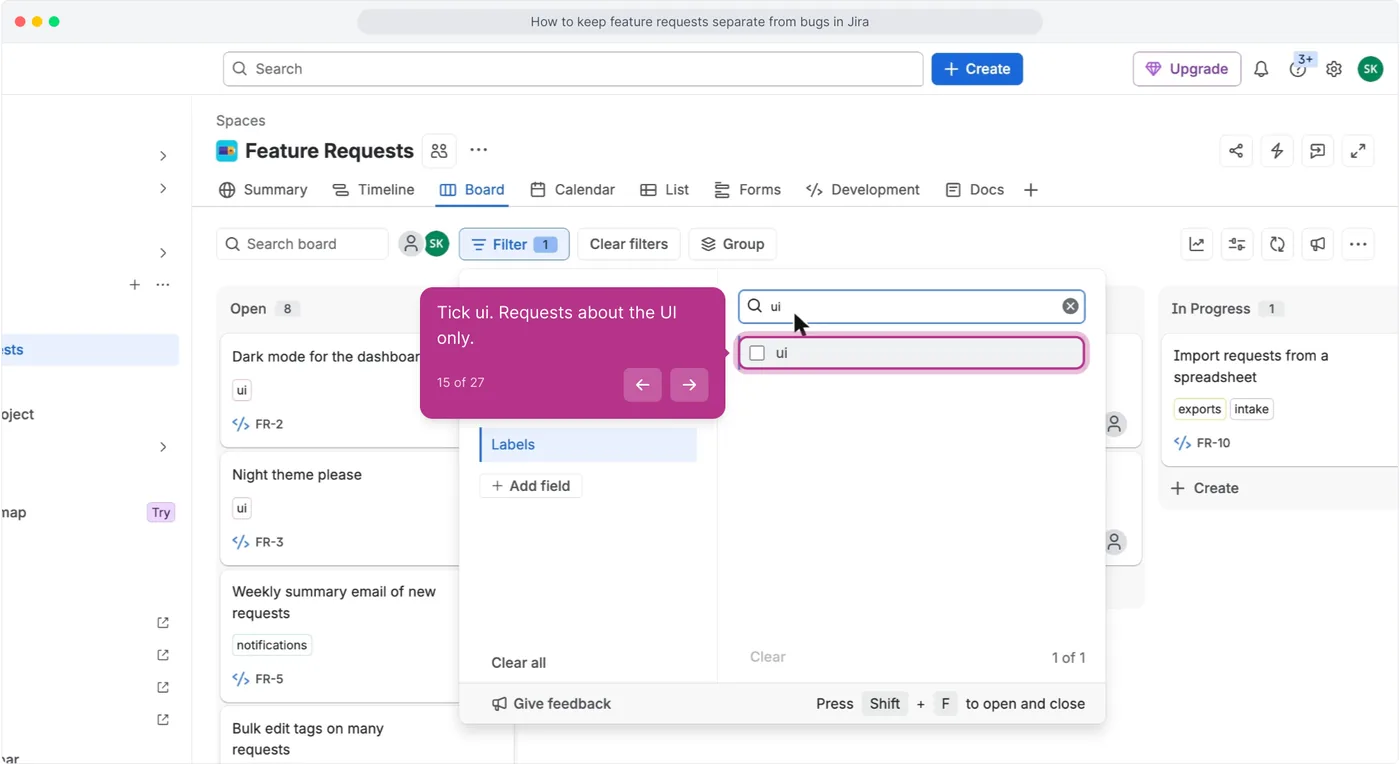
Add a label on top, such as ui, to narrow to one product area.
Type answers what kind of thing it is. Labels answer which part of the product it touches.
Keep those two jobs apart and neither list turns into mush.
Untick everything and tick Bug instead.
Two work items come back. Somebody filed them in the request queue because it was the board that was open.
Finding them is the point of the habit.
3. Save the split so you stop rebuilding it
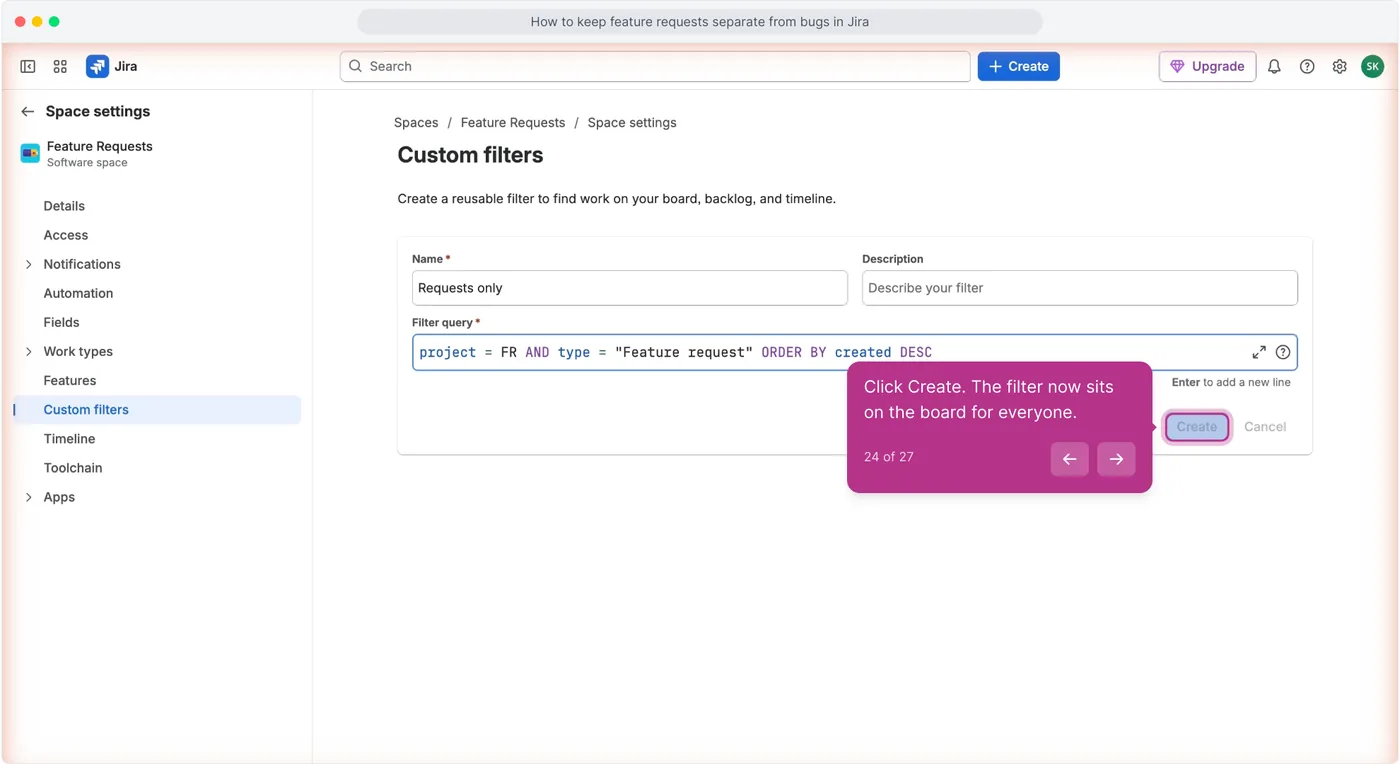
Open More actions, then Manage custom filters, then Create custom filter, name it Requests only and enter project = FR AND type = "Feature request".
Atlassian defines a custom filter as "a saved and reusable search term that helps you find work items in team-managed spaces" (Jira Cloud support).
Make a second one called Bugs in here with type = Bug.
4. Move what landed in the wrong place
Open the bug, click Actions, choose Move, pick the Bugs space, and map the status if Jira asks.
The two spaces have different columns, and Atlassian's instruction is that "You can map the statuses from your source space to the right statuses in your new workflow" (Jira Cloud support).
The key changes, so paste the new one wherever the old was referenced.
5. Run one JQL query a week
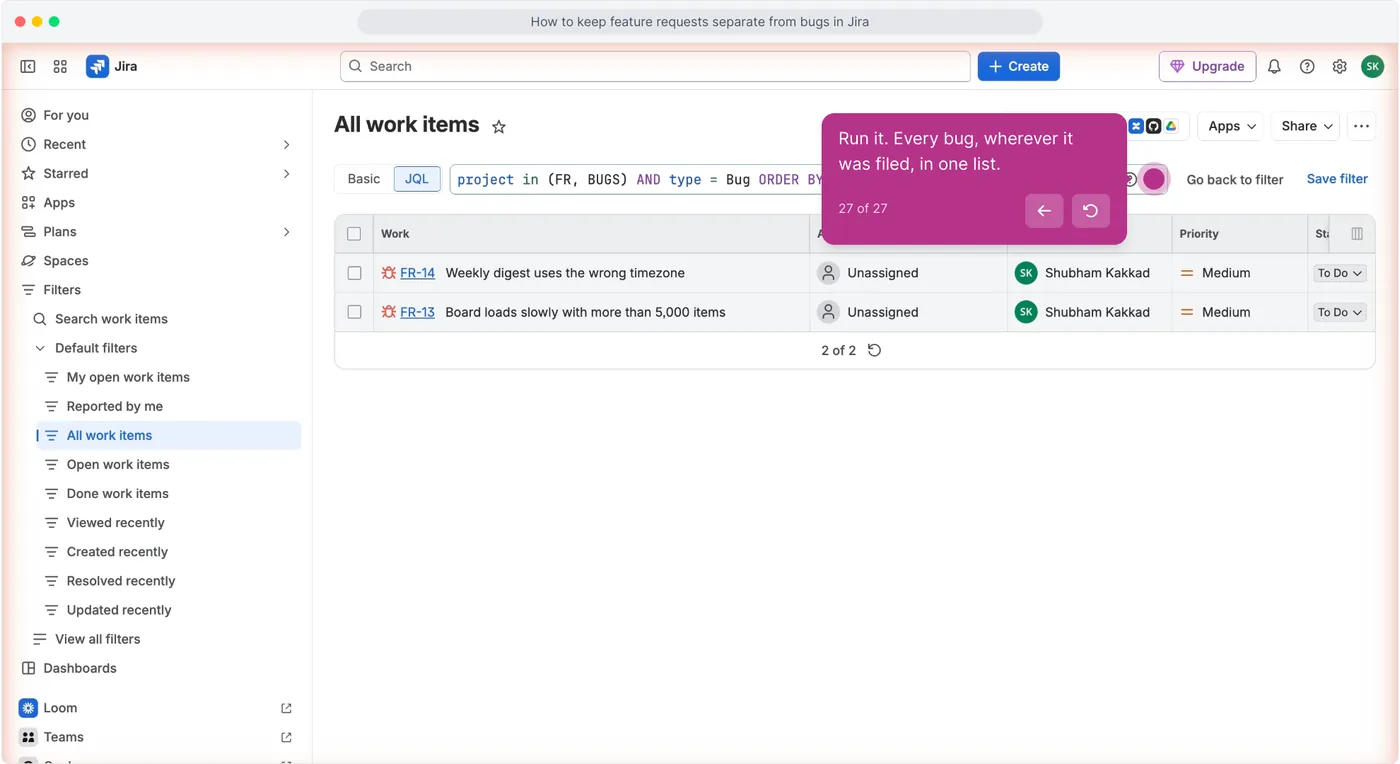
Open Filters, then All work items, switch to JQL and run project in (FR, BUGS) AND type = Bug ORDER BY created DESC.
Anything at the top with an FR key came in through the request door this week. Move it.
Fifteen minutes on a Monday keeps both queues honest, and no configuration replaces the habit.
What plain Jira still cannot do
- Stop the wrong work type being chosen. Nothing validates that a Feature request is a request. The 2019 thread that recommended separate issue types still leaves a person deciding which is which (Atlassian Community, 2019). A person is the filter.
- Move a stray on its own. Move is manual, with a status mapping screen each time; Bulk change can move several at once, but someone still has to select the strays and run it (Jira Cloud support). The community answer that automates it reaches for Automation, "use Automation for Jira to create a linked issue when moved to development" (Atlassian Community, 2019), and free sites get a small monthly rule budget.
- Hide the second space. On a site that has always been on the Free plan, "everyone with access to Jira is an admin for all Jira spaces" (Jira Cloud support). A second space separates the view, not the access.
- Let the reporter see which pile it landed in. Neither space is customer-visible. Atlassian's 2023 answer is that customers "aren't considered users because they're not licensed" (Atlassian Community, 2023). They filed it and will never know it was reclassified.
Keep it, or stop here
- Keep it if both kinds of work come from people who already have a Jira seat. Two work types and a saved filter are enough, and cost nothing.
- Stop here when the mix comes from customers. The sorting is then done by someone who does not know your work types exist, and no board configuration fixes intake that arrives wrong.
The alternative, and what it does not do
sarvaFeed is the intake board in front of Jira. Customers post and vote without a seat, duplicates are caught when a post is created, statuses run Open to Shipped, and a changelog entry emails the people who voted.
The free plan is one admin seat, one board, 500 posts and unlimited voters (pricing). What it does not do: there is no Jira sync.
When a request is planned you create the Jira work item by hand and paste the board link into it, so the request and the Jira item are created in two deliberate steps rather than one hurried one. See feature request management.
Questions people ask
Should feature requests and bugs be in the same Jira project?
They can be, if they are two different work types and the board is filtered by type. Split them into two spaces once the two queues are groomed on different rhythms, since one board filter cannot give two teams two backlogs.
How do I stop bugs being filed as feature requests in Jira?
You cannot prevent it in plain Jira. The work type is chosen by whoever creates the item and nothing validates it. The practical fix is a weekly JQL search for type = Bug inside the request space, then moving each one across by hand.
Can I use quick filters to separate bugs from requests in a team-managed space?
No. Atlassian's quick filter configuration is company-managed only. In a team-managed space you use the board filter panel, which is private to you, or a saved custom filter under More actions, then Manage custom filters.